
Prop firms do not all calculate drawdown the same way. Confirm whether your limits are static or trailing, what time the daily rule resets, and whether commissions or special restrictions apply.
Enable it deliberately
- Open Settings → Prop.
- Turn Prop protection on.
- Enter the limits from your account agreement.
- Review every tab and press Apply.
- Confirm the Settings in use panel reflects the source you intended.
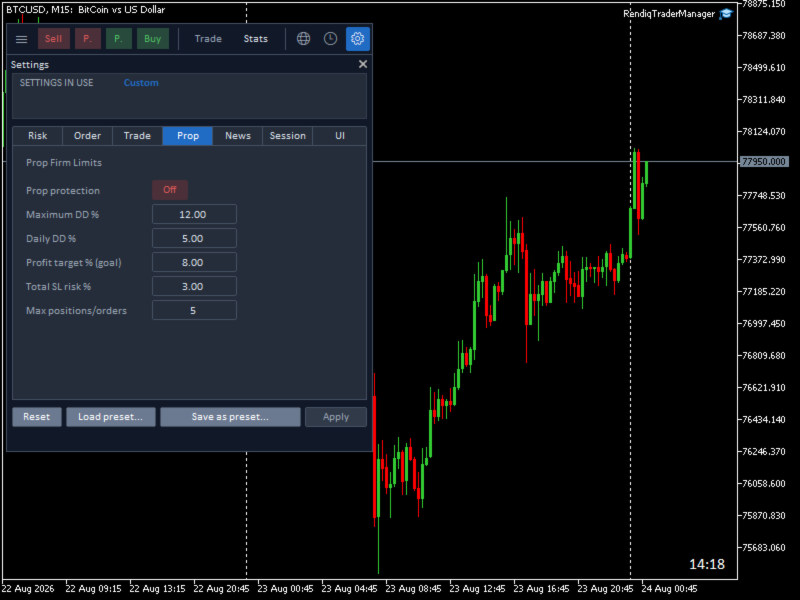
What each field means
| Setting | What Rendiq Trade Manager checks before new exposure |
|---|---|
| Maximum DD % | Worst-case projected equity must stay above the configured percentage loss from the account’s starting funded balance. |
| Daily DD % | Worst-case projected equity must stay above the configured percentage loss from the start-of-day balance. |
| Profit target % (goal) | A progress goal shown in Statistics. It does not lock trading when reached. |
| Total SL risk % | Combined entry-to-SL loss from open positions, active pending orders, and the proposed order must stay within this percentage of current balance. |
| Max positions/orders | Open positions + active pending orders + the proposed order must not exceed this count. |
What “account-wide” includes
- Every open position in the account.
- Every active pending order in the account.
- Every symbol—not only the current chart.
- Manual positions and orders, plus those created by other tools.
- All Magic numbers.
If an existing position or pending order has no valid stop loss—or its risk cannot be calculated—Rendiq Trade Manager refuses to add new exposure while Prop protection is on.
How the safety projection works
Entry → Stop Loss
Counts actual loss exposure. A position protected at break-even or better contributes no entry-to-SL loss risk.
Current price → Stop Loss
For live positions, counts the equity decline still remaining to the stop. This avoids subtracting an existing floating loss twice.
Active pending orders and the proposed order contribute their full entry-to-SL risk because they have not yet produced floating P/L.
Why an order may be blocked
Maximum positions/orders would be exceeded
Cancel an unnecessary pending order, close a position, or increase the configured limit only if your prop rules genuinely permit it.
Total stop-loss risk would exceed the limit
Reduce the proposed risk, protect existing exposure more tightly where valid, or remove an unnecessary pending order.
Maximum or daily drawdown would be breached
The worst-case combined stop outcome is below the permitted equity floor. Do not increase the setting unless it was entered incorrectly.
An existing item has no valid stop
Add a valid protective SL to the position or pending order, or remove that exposure before trying again.
The proposed risk could not be calculated
Check entry, SL, symbol prices, connection, and broker data. Rendiq Trade Manager will not assume zero risk when information is missing.
A blocked order is not submitted. The notification names the proposed item as a trade or pending order and identifies the first failed rule, often with the limit and projected values.
Read the notification precisely
| Notification contains | Meaning | Safe next check |
|---|---|---|
| Positions= · Pending= · Max= | The next item would exceed the combined account-wide count. | Compare the count with MetaTrader’s open positions and active orders. |
| Limit= · Projected= | Combined entry-to-SL money risk would exceed Total SL risk %. | Review every active SL and the proposed normalized volume. |
| Floor= · Base= · WorstCaseEquity= | The maximum-drawdown projection would cross its equity floor. | Verify the funded start balance and configured Maximum DD %. |
| Floor= · WorstCaseEquity= | The daily-drawdown projection would cross today’s equity floor. | Verify the broker-server day and configured Daily DD %. |
| No valid stop loss | An existing position or pending order cannot be treated as bounded risk. | Add a valid SL or remove that exposure before adding another. |
Profit target is a goal, not a stop switch
Reaching the target changes progress in the Statistics view. It does not automatically disable Buy, Sell, or pending orders. This avoids silently changing trading behavior at a milestone. If your plan says to stop at target, treat that as an explicit session decision.
Know the current drawdown model
Maximum DD uses a static starting funded balance. Daily DD uses the broker-server day beginning at midnight. If your firm uses trailing drawdown, a different reset timezone, highest-equity rules, or special consistency rules, Rendiq Trade Manager’s current fields do not model those differences automatically.
Rendiq Trade Manager can only block orders submitted through Rendiq Trade Manager. MetaTrader does not let one EA intercept a manual order or an order submitted by another EA. Those external orders are still included in the next Rendiq Trade Manager check.